01
ZPL editor
Edit ZPL with a language-aware Monaco workspace built for label source.
- Syntax highlighting and formatting
- Parameter-aware command help
- Source-linked diagnostics
Paste or type Zebra Programming Language and preview the label instantly. The viewer renders in your browser, so your ZPL is never uploaded to a remote service.
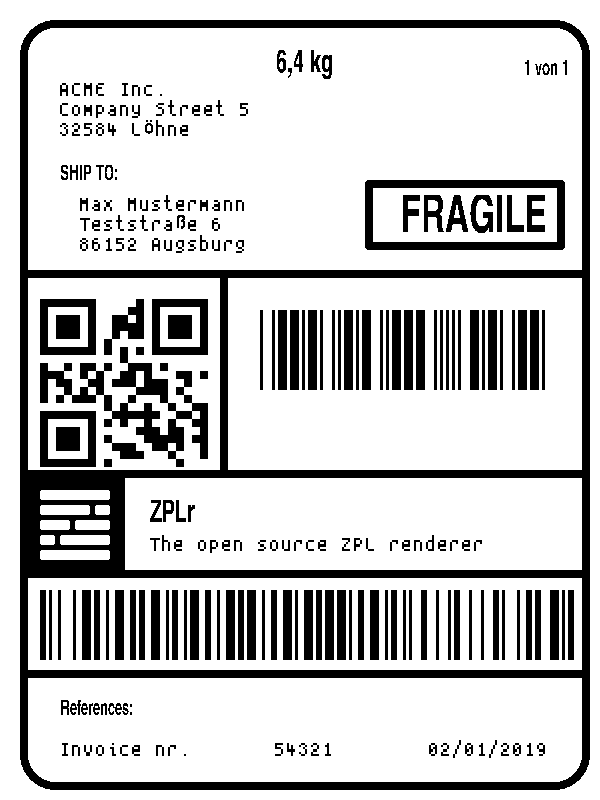
Check ^PW label width, ^LL label length, and ^FO field positions. Dimensions are in printer dots. In the editor, match the print density to your printer and review any diagnostics.
ZPLr renders supported text, graphics, and barcodes such as ^BC Code 128 and ^BQ QR codes. Some commands are partial or control printer hardware without drawing pixels. Read the command support notes and verify the output on your target printer.
Editor, viewer, and designer
One source / three surfaces
Start in source code, inspect the rendered result, or select fields directly on the label. Every view stays synchronized, so you can move quickly without losing the underlying ZPL.
Edit ZPL with a language-aware Monaco workspace built for label source.
Render a live black-and-white label preview without sending code to an external API.
Work directly on supported fields while keeping the underlying ZPL synchronized.
01 / Live ZPL preview
The online ZPL viewer renders a deterministic one-bit raster locally as you type. Source-linked diagnostics, command documentation, formatting, and safety limits help you find problems before a label reaches a print workflow.


02 / Visual ZPL designer
Drag, resize, align, distribute, lock, hide, and reorder supported fields on a WYSIWYG canvas. Rulers, snapping, manual guides, layers, and property controls make precise label layout faster.
Start designing a ZPL label03 / Variable data and assets
Import CSV or JSON, bind columns to ^FN fields, preview each record, and turn ZPL into PNG batches. Images and fonts are managed in the same local workspace.
Import structured data and map columns to numbered ZPL fields.
Import workspace assets and manage their ZPL resource names.
Step through live record values before producing a batch.
Save ZPL, PNG images, batch PNGs, or a complete workspace ZIP.

Private by architecture
ZPLr parses, renders, and edits labels on your device. Your ZPL and imported data never leave this browser for processing. There is no account, upload API, or server-side label processing.
Label source and imported datasets are processed by the browser application.
Open the editor and begin working without creating a profile.
Inspect the MIT-licensed code and integrate the same engine yourself.
04 / JavaScript and TypeScript ZPL library
Use ZPLr as a Node.js ZPL renderer in backend jobs or as a browser library for local previews. Both entries share the parser, diagnostics, command capabilities, and deterministic raster model.
zplr · zplr/node// "zplr/node" exposes the same Node.js API.
import { renderZplPNG } from "zplr";
import { writeFile } from "node:fs/promises";
const [png] = await renderZplPNG(source, {
printDensity: 8,
});
await writeFile("label.png", png);zplr/webimport { renderZpl } from "zplr/web";
const job = await renderZpl(source);
const canvas = job.labels[0].canvas;
document.querySelector("main")?.append(canvas);Built for real label work
Inspect addresses, tracking barcodes, routing blocks, and print dimensions.
Build UPC, EAN, Code 128, Data Matrix, QR, and item-label templates.
Bind CSV or JSON records to ^FN fields and preview every variation.
Embed ZPL parsing and rendering in Node.js services or browser interfaces.
Frequently asked questions
Need implementation details? The project documentation covers command support, diagnostics, limits, and runtime APIs.
A ZPL editor helps you write and inspect Zebra Programming Language label source. ZPLr combines source editing, command guidance, diagnostics, live rendering, and visual field editing in one browser workspace.
A ZPL viewer turns Zebra Programming Language source into a visual label preview. ZPLr lets you paste and view ZPL online while running the parser and renderer locally in your browser, without uploading your label or data to a rendering server.
Yes. Supported fields can be selected, dragged, resized, aligned, reordered, locked, hidden, and edited through layers and property controls while the ZPL source stays synchronized.
Yes. Import zplr or zplr/node for Node.js, and zplr/web for browser projects. Both entries expose typed parsing and rendering APIs built from the same engine.
Yes. You can export the active label as PNG, generate PNGs for variable-data records, save the ZPL source, or download a workspace ZIP containing labels, datasets, and assets.
ZPLr recognizes more than 200 commands across rendering, state, storage, control, and compatibility categories. The public command-support document records which commands are supported, partial, or recognized without rendered output.
Ready when you are
Open the editor with a working shipping-label example, then change the code, move fields visually, or connect variable data.
Open the free ZPL editor